
Talky time direct routing
Integrate business telephony into Microsoft Teams®, no infra change
Bring your existing phone systems and SIP trunks into Microsoft Teams® without forced migrations or operational downtime.
Talky Time is on the official list of Microsoft-certified Direct Routing providers for Microsoft Teams®.
With Talky Time Direct Routing you get
Telephony within Microsoft Teams®
Make and receive calls directly from the Teams interface, without switching apps or changing your workflow. Your business numbers, call queues, and IVR flows remain exactly as they are.
No forced migration
Keep your existing PBX or SIP lines. Talky Time works alongside your current setup rather than replacing it. Integrate, don't start from scratch.
Multi-site and multi-tenant
A single Teams tenant can manage multiple company locations with independent numbering. For MSPs, multi-client management from a single platform facilitates logical isolation.
Pay-per-use, with no surprises
You only pay for active users and channels. There are no fixed costs for unused lines and no penalties for volume changes.
Integrate your communications with Microsoft Teams®
Three ways to connect your telephony to Teams
Existing PBX integration
SIP Trunk
SIP User

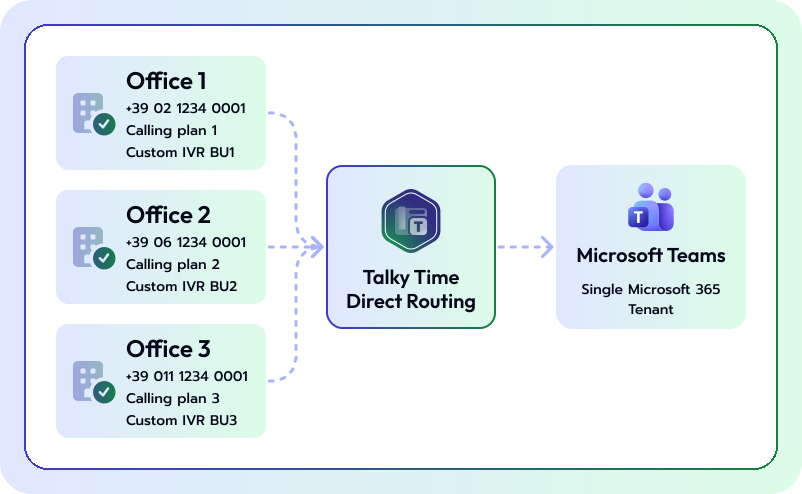
A unique numbering plan for every office, one single Teams tenant
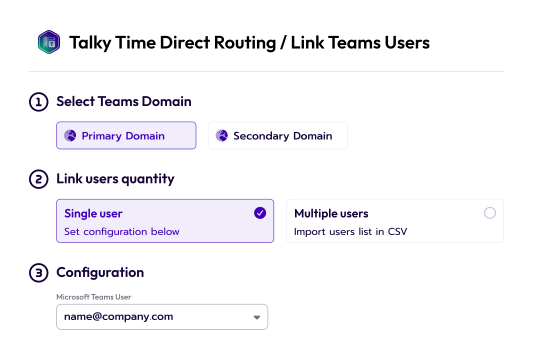
Talky Time Direct Routing handles multi-site configurations on a single Microsoft 365 tenant: different business numbers for each location, independent calling plans, and custom IVR flows for every office. For bulk activations, Talky Time supports configuration templates that allow you to replicate the same setup across dozens of users or locations in just a few steps, without having to reconfigure each user manually.
International numbers and foreign offices
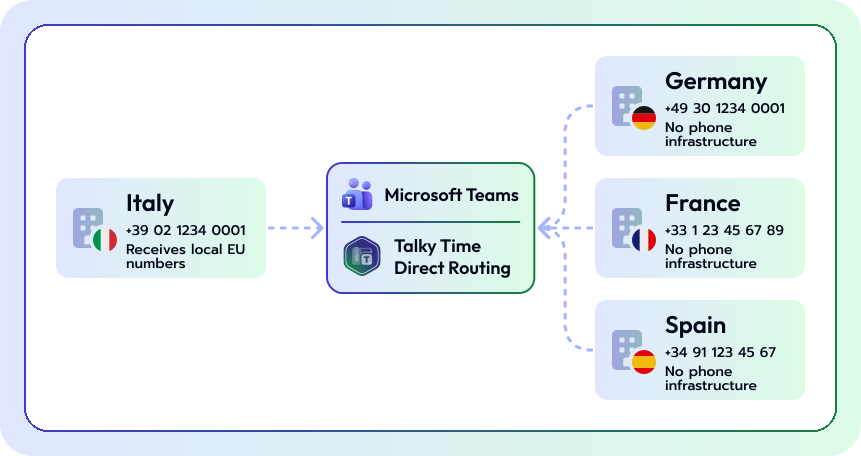
Talky Time supports international numbering and the activation of offices in other European countries: you can assign a local German, French, or Spanish number to a Teams user in Italy, or activate telephony for a foreign branch without needing local infrastructure. This makes it ideal for companies with a multi-country presence and for MSPs managing clients with international locations.
Risorse

Cloud privacy isn't enough without access control. Discover how digital sovereignty ensures you maintain real control over your data.

SIP Account
Simplify the request and management of numbers and SIP accounts with an easy-to-use portal, giving you complete autonomy.

Unified Communication
Discover all the benefits of using a unified solution for business communication.
FAQ
What is Direct Routing for Microsoft Teams?
Direct Routing is the Microsoft Teams feature that lets you connect any telephone carrier or existing PBX infrastructure to Teams, using Teams as a unified calling client. Talky Time Direct Routing delivers Direct Routing as a Microsoft-certified managed service.
Do I need to replace my PBX to use Talky Time Direct Routing?
No. Talky Time Direct Routing works alongside your existing PBX through an SBC (Session Border Controller): the phone system keeps working as before, and Teams becomes the calling client for users. Migration can be gradual, even by individual department or user.
What is the difference between PBX Integration, SIP Trunk, and SIP User?
PBX Integration keeps your existing phone system and connects it to Teams. SIP Trunk uses your carrier's SIP lines and routes them to Teams through Talky Time Direct Routing. SIP User connects individual SIP users directly to Teams, which is useful for quick activations or pilots. The CloudFire team helps you choose the right mode for your infrastructure.
Can I manage multiple offices with a single Microsoft 365 tenant?
Yes. Talky Time Direct Routing supports multi-site configurations on a single tenant: different numbers per site, independent calling plans, and custom IVR flows. For bulk activations, a template system is available to replicate configurations across multiple users or sites in parallel.
Can I activate international phone numbers or offices abroad with Talky Time Direct Routing?
Yes. Talky Time Direct Routing supports international numbers and activating sites in other European countries. You can assign a foreign local number to a Teams user in Italy, or activate telephony for a site in Germany, France, Spain, or other countries without dedicated local infrastructure.
What infrastructure does Talky Time Direct Routing run on?
On Microsoft Azure. The choice fits the service: Direct Routing is a native Teams feature, and Azure infrastructure ensures optimal compatibility, reduced latency, and automatic updates synchronized with Teams.
Do Microsoft Teams updates affect the Talky Time Direct Routing service?
No. Talky Time Direct Routing automatically handles compatibility with every Teams update: when Microsoft releases new versions or changes how Direct Routing behaves, Talky Time updates itself without requiring any manual action on your part.
Can MSPs resell Talky Time Direct Routing?
Yes. The platform supports multi-tenant architectures: each of the MSP's customers has its own isolated space with independent configurations. The template system lets you onboard new customers quickly and in a standardized way. Contact the CloudFire team for details on the partner program.
How is call security managed on Talky Time Direct Routing?
Calls travel over encrypted channels. The Azure infrastructure that Talky Time Direct Routing runs on inherits Microsoft's security certifications. CloudFire handles operational monitoring of the service.
How much does Talky Time Direct Routing cost?
Talky Time Direct Routing uses a pay-per-usage model: you pay for active users and channels. No fixed costs for unused lines. Pricing depends on the integration mode (PBX, SIP Trunk, SIP User) and the number of users. Request a quote from the CloudFire team.