
sip account
Cloud VoIP numbers: activate and manage them yourself
Bring your existing phone systems and SIP trunks into Microsoft Teams without forced migrations or operational disruption.
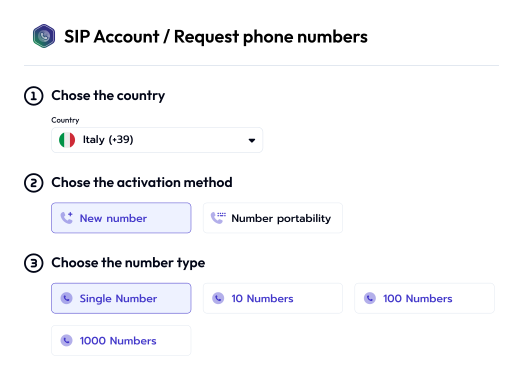
Break down the barriers to your communication with a SIP Account
Simplify the request and management of SIP numbers and accounts with an easy-to-use, self-service portal. With SIP Account, you can request cloud-based VoIP numbers and lines with no country restrictions and at competitive rates.
National and International Numbers
Request numbers from any country directly through the CloudFire Console, with no intermediaries and no country- or carrier-specific processes.
Individual Numbers and Ranges (GNR)
Choose a single number or a continuous range of numbers based on the client's needs.
New or switching from another provider
Request new numbers or transfer existing ones without changing your number. The porting process is managed entirely through the CloudFire Console.
Activate your SIP account independently
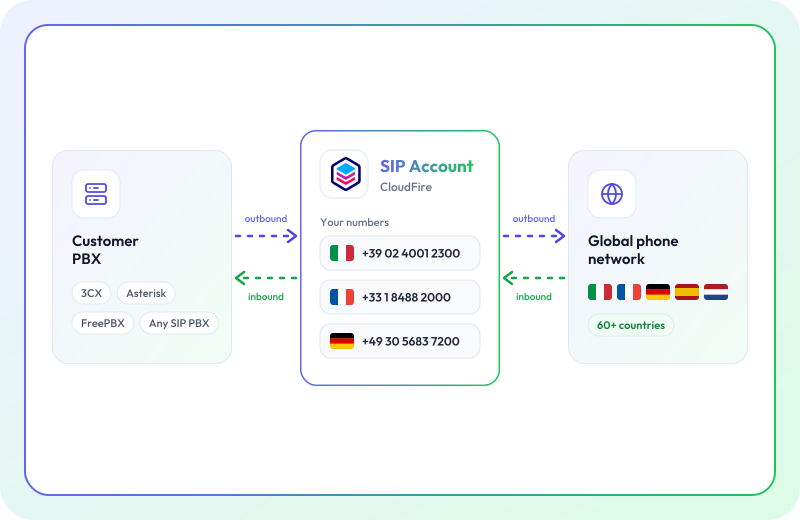
SIP Trunking
Activate the SIP protocol to connect your client's PBX and manage calls anywhere in the world with international SIP trunks. Compatible with any device or PBX that supports the standard SIP protocol — no proprietary configuration, no lock-in.
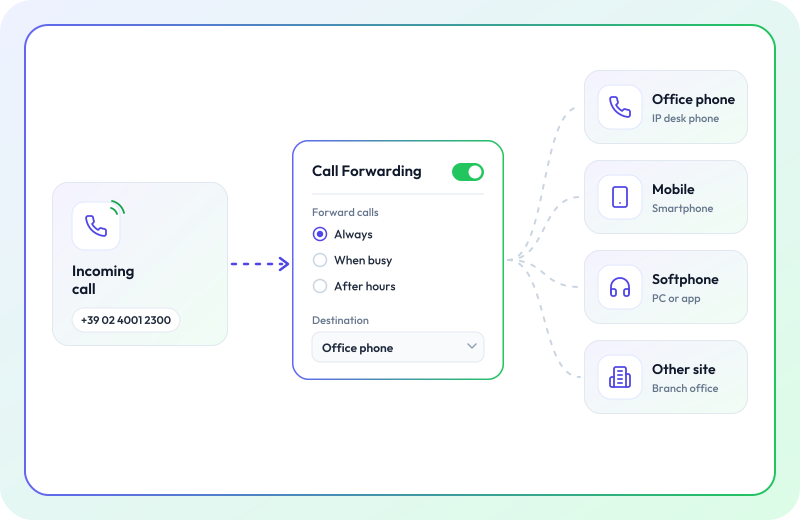
Call Forwarding
Set up call forwarding to route calls to any device—landline, mobile, or softphone—regardless of your location. This is ideal for multi-site setups or ensuring you stay reachable by clients even when you're out of the office.
Why choose a CloudFire SIP Account?
Self-service activation for every customer
From the CloudFire Console, you can request and manage phone numbers for each client independently, without the need for manual processes or ticket requests. Every number can be activated in just a few steps using our guided wizards.
Pay-per-use, zero fixed costs
No setup fees, no fixed monthly charges for unused numbers. You only pay for active services — the ideal model for managing a fluctuating client portfolio.
National and international coverage
Phone numbers available in over 60 countries. Activate local numbers for your clients' international markets without the need to establish relationships with local carriers in every country.
Compatible with any stack
Any on-premise PBX, softphone, or VoIP device that supports the standard SIP protocol integrates without modifications. No dependency on proprietary hardware or software.
Risorse

Cloud privacy isn't enough without access control. Discover how digital sovereignty ensures you maintain real control over your data.

3CX
Get 3CX licenses for a cloud-based PBX and host the system directly on our infrastructure.

Unified Communication
Discover all the benefits of using a unified solution for business communication.
FAQ
What is CloudFire SIP Account?
SIP Account is the CloudFire product, available in the CloudFire Console, that lets you request national and international PSTN numbers — new or ported — and activate and manage SIP accounts for configuration on on-premises PBXs and VoIP devices. It works as a voice communication channel over the internet using the SIP protocol.
Why buy international numbers from CloudFire?
CloudFire simplifies the process of requesting and porting phone numbers from around the world: it eliminates the complexities that vary by country, carrier, and area code, offering a single portal to manage all your clients' numbers. It is particularly useful for MSPs and resellers managing clients with locations in multiple countries.
How do I request and activate a SIP Account?
Log in to the CloudFire Console, fill in the required details in the SIP Account section, and track your request independently. For the full guide, check our Knowledge Base.
What types of numbers can I get?
National and international PSTN numbers, available as new lines or via porting. Single numbers and ranges (DDI — direct inward dialing) are available. Coverage is provided in over 60 countries.
Is SIP Account compatible with any PBX or VoIP device?
Yes. SIP accounts created in the CloudFire Console are compatible with any on-premise PBX and VoIP device that supports the standard SIP protocol — with no proprietary configurations and no vendor lock-in.
6. Can I integrate SIP Account with Microsoft Teams?
Yes. With Talky Time Direct Routing, you can unify traditional communication with Microsoft Teams, using CloudFire SIP numbers as incoming lines for your Teams calls.
How long does it take to get numbers?
Processing times depend on the type of request: up to 1 business day for new individual numbers or ranges, up to 16 days for individual porting, and up to 21 days for range porting. These timeframes refer to the completion of the process by the operators involved.
What documents do I need for number porting?
To request a number porting, you will need: a migration code, a Letter of Authority, and the most recent invoice from your current provider showing the number. The complete guide is available in our Knowledge Base.